
Quick Search the Help Center
Multiple Users on a Single OS Requires Microsoft Windows Server Licensing
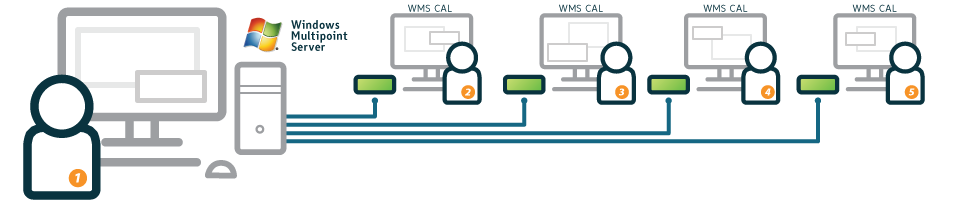
Multi-user Single OS: Multiple simultaneous interactive users sharing a single operating system
For applications where multiple interactive users are simultaneously sharing a single operating system, standard Microsoft Windows Server licensing applies. This means that the shared host computer (or virtual machine) runs a Microsoft Windows Server operating system.
In addition a Microsoft Windows Server Client Access License (WS CAL) and a Microsoft Remote Desktop Services Client Access License (RDS CAL – formerly known as a Microsoft Terminal Services Client Access License or TS CAL) are required for each end-user or device that accesses Windows Server (and for the host computer if the host computer is used as a user station).
Also, Microsoft's Windows Multipoint Server can be used and instead requires a Windows MultiPoint Server CAL (WMS CAL) for each access device (and for the host computer if the host computer is used as a user station).(1) The diagram shows an example configuration with five users sharing a single computer running Windows MultiPoint Server.
For further details on Microsoft’s multi-user licensing please refer to Microsoft’s website and licensing brief titled: "Licensing Windows Client and Server Operating Systems in Multiuser Scenarios"
Applicable NComputing Products: RX300, L-series, MX-series, vSpace PRO Client
Supported OSes: Windows Server 2012, Windows Server 2008 R2, Windows Server 2016, Windows MultiPoint Server 2012(2), Windows MultiPoint Server 2011
1 Refer to the OS Compatibility Matrix for current OS support information.
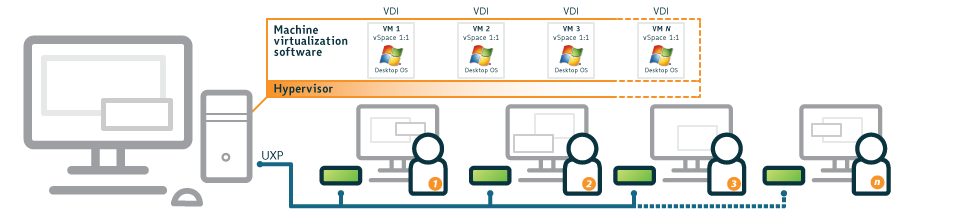
1:1 Virtual Desktop Infrastructure (VDI): A single user accessing a virtual instance of an operating system hosted on a server
In environments where a remote access device connects to a Microsoft client operating system (such as Microsoft Windows 10, Windows 8, or Windows 7) that is running inside a virtual machine that is, in turn, running on a host computer, a different set of Microsoft licensing options apply.
The primary approach to OS licensing in this scenario is to use Microsoft Windows Virtual Desktop Access (VDA) licensing. This VDA licensing approach is available for both PCs as access devices and thin clients – the latter of which applies to NComputing access devices. VDA for thin client licensing is an annual subscription license available in Microsoft Volume Licensing. The virtual machines can be run directly on a hypervisor or on machine virtualization software such as Microsoft Hyper-V running in a Microsoft Windows Server operating system.
You may not use virtualization, multiplexing or short-term reassignment of licenses to reduce the number of licenses required.
For more information on licensing Windows client operating systems such as Microsoft Windows 8 with virtual machine technologies, refer to the following Microsoft licensing brief titled: "Licensing Windows Desktop OS for Virtual Machines." Note that in all cases, the license terms for your specific version of Windows and the terms of your NComputing vSpace EULA govern your rights and obligations in these use models.
Applicable NComputing Products: RX300, L-series, MX-series, vSpace PRO Client
Supported OSes for Hosting VMs: Windows Server 2012, Windows Server 2008 R2, Windows Server 2003 R2, Windows MultiPoint Server 2012, Windows Server 2016
Supported OSes using VDA licenses for access points:(1) Windows 8,(2) Windows 7, Windows 10
Use in this scenario is subject to the Microsoft Windows client operating system license terms
1 Refer to the OS Compatibility Matrix for current OS support information.
NComputing technology enables a variety of single user configurations. For example, you can use NComputing systems to construct digital display systems and multi-monitor workstations. You can also enable a variety of remote access configurations to give a single user access to one or more machines from one or more locations – for the ultimate computing access flexibility. For these single user applications, the use of Microsoft client operating systems such as Windows 10, Windows 8 and Windows 7 is appropriate. Note that in all cases, the license terms for your specific version of Windows and the terms of your NComputing vSpace EULA govern your rights and obligations in these use models.
In these examples, a Microsoft client operating system such as Windows 10, Windows 8 or Windows 7 may be used on the computer. Server operating systems may be used as well. Note that in all cases, the license terms for your specific version of Windows and the terms of your NComputing vSpace EULA govern your rights and obligations in these use models.
Digital Display Systems
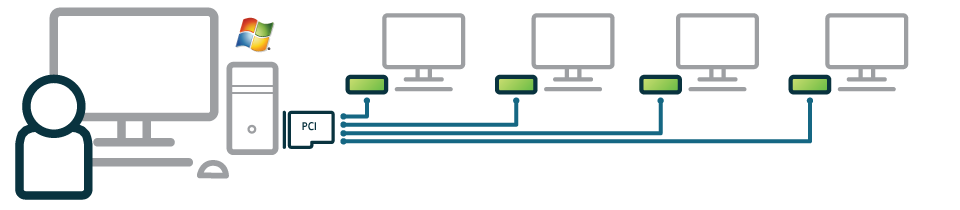
Digital Display Systems: Multiple mirrored or independent displays powered by a single system used by a single user
Where a single computer is used by a single user, NComputing products can be used to display information on a number of additional screens. In this case, each screen is for visual display only and cannot be connected to a keyboard or mouse for interactive use. Information on each screen may be the same or different from screen to screen. Screens may be located close together (e.g. video wall configuration such as airport flight status monitors) or spread throughout an organization (e.g. displaying the daily lunch menu).
Applicable NComputing Products: RX300, L-series, MX-series, vSpace PRO Client
Windows Client OS: Windows 8, Windows 7, Windows 10
Multi-Monitor Stations
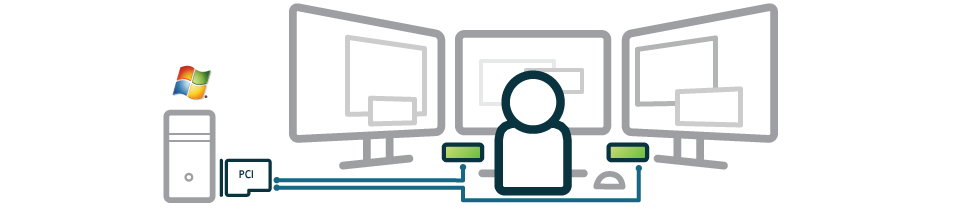
Multiple Monitor Systems: Monitors display the same or different information
Using a single computer, a single user may use NComputing products to interact with several monitors at the same time. Each monitor may display the same information (mirror mode) or each monitor may display different information to deliver an extended desktop. In each case, the single user interacts with all screens through a single keyboard and mouse. In both of these of these examples, a Microsoft client operating system such as Windows 10, Windows 8 or Windows 7 may be used on the computer.
Applicable NComputing Products: RX300, L-series, MX-series, vSpace PRO Client
Windows Client OS: Windows 8, Windows 7, Windows 10
Remote Access of One or More Hosts
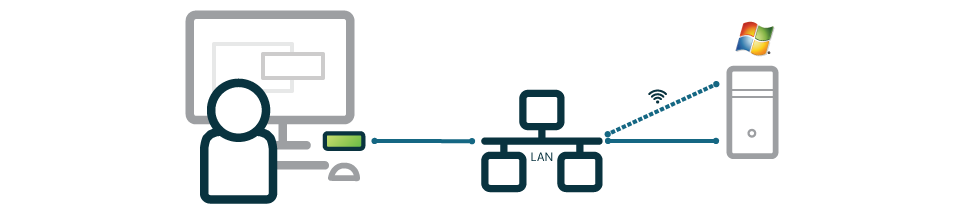
Remote Access: A single user accesses a computer over a remote connection from an access device.
In this use case, a single primary user accesses a computer over a remote connection from an NComputing access device. NComputing vSpace software runs on the host system and enables the connection to the remote device. This user is the only one accessing the computer at a time. A user could also extend this to enable access to multiple hosts from a single location provided each host is licensed and the user is the primary user of each host device.
Applicable NComputing Products: RX300, L-series, MX-series, vSpace PRO Client
Windows Client OS: Windows 8, Windows 7, Windows 10
Single-User Access From Multiple Locations
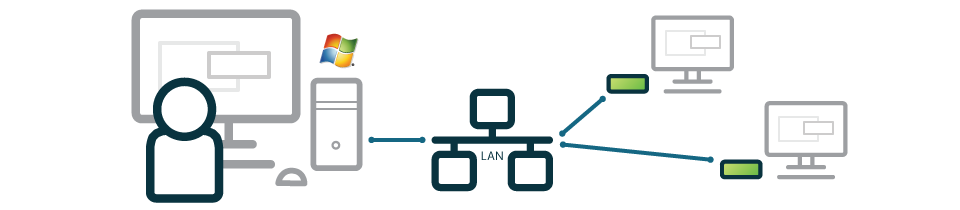
Single-user, Multiple locations: A single computer running NComputing software is accessed from multiple locations by a single user at a time
A single computer running NComputing vSpace may be accessed from multiple locations by a single user at a time. For example, a single primary user may wish to access a session on his/her home office PC from multiple remote access devices in various locations in his/her home (e.g. kitchen and living room). Each location may have different settings associated with the device in that location (i.e. different screen resolution, font size, etc.). Other users may access a session from any device using NComputing technology, if the remote device is separately licensed to run the client operating system software. Only one user is licensed to interact with the host PC at a time.
Applicable NComputing Products: RX300, L-series, MX-series, vSpace PRO Client
Windows Client OS: Windows 8, Windows 7, Windows 10
1 Except vSpace PRO Client
Frequently Asked Questions
Q: What is the appropriate MS operating system product for me to license and use for multi-user computing with NComputing products:
A: Microsoft Windows Server products are the operating systems licensed, designed and supported by Microsoft for multiple simultaneous users. You must also obtain the appropriate number of Microsoft OS and client access licenses that are necessary for the number of users or devices that access and use the server. Please refer to the OS Compatibility Matrix for current OS support information.
Q: Can I run Windows 7, Windows 8, Windows 10, Windows 11 or any other Microsoft client operating system product to allow multiple simultaneous users to access and use the operating system software?
A: No, that is not permitted. You should instead purchase and run the Microsoft Windows Server operating system software that is appropriate for your needs. You must also obtain the appropriate number of Microsoft client access licenses that are necessary for the number of users or devices that access and use the server. Only Microsoft Windows Server software is licensed, designed and supported by Microsoft for multiple simultaneous users.